Automation

Automatic task via email

Creating tasks when receiving email from clients

Features

Tasks when receiving email
Filter by sender
Filter by topic
Setting up task text
Choosing the Responsible

Installation and setup guide

Detailed guide for working with widget "Automatic task via email"

How the widget works

The "Automatic task by email" widget automatically creates tasks in transactions when a client reads an email sent to him by a manager from Kommo.

The widget tracks the moment when a client opens and reads an email sent to him by a manager. After the client reads the letter, a task is automatically created in the deal of this contact at the selected stages of the funnel. This helps you understand that the client has received and read your letter and reminds you to follow up.

  • The widget tracks the reading of emails on the client side (by tracking pixel)
  • The task is created in the transaction of the contact who read the email
  • Works only on selected stages of the funnel, allowing precise control over automation
  • Can be configured for different funnels and stages simultaneously
  • If you do not specify stages, the task is created in the first deal found for the contact

Widget features

The widget provides powerful tools for automating work with email communications and monitoring the reading of important letters by clients.

The widget uses technology to track the opening of letters through a special invisible pixel, which is loaded when a client opens a letter. This allows you to accurately determine the moment when the client actually read your letter.

  • Selective work: The widget creates tasks only at those stages of the funnel that you have selected in the settings
  • Multiple selection: You can specify several stages simultaneously in different funnels
  • Precise control: If a contact's deal is at a stage not specified in the settings, the task is not created
  • Versatility: Suitable for any funnel - sales, leads, customers

When a client reads an email and their deal is at one of the selected stages, the widget automatically creates a task in that deal. The task contains information about reading the letter and serves as a reminder to the manager about the need for the next contact with the client.

If a contact has multiple active deals in the selected stages, the widget will create a task in each corresponding deal. This ensures that no important communication is left unattended.

  • Works with all types of funnels in your Kommo
  • Allows you to configure different logic for different stages
  • Takes into account the structure and specifics of your business process
  • Does not create unnecessary tasks at irrelevant stages

Widget setup

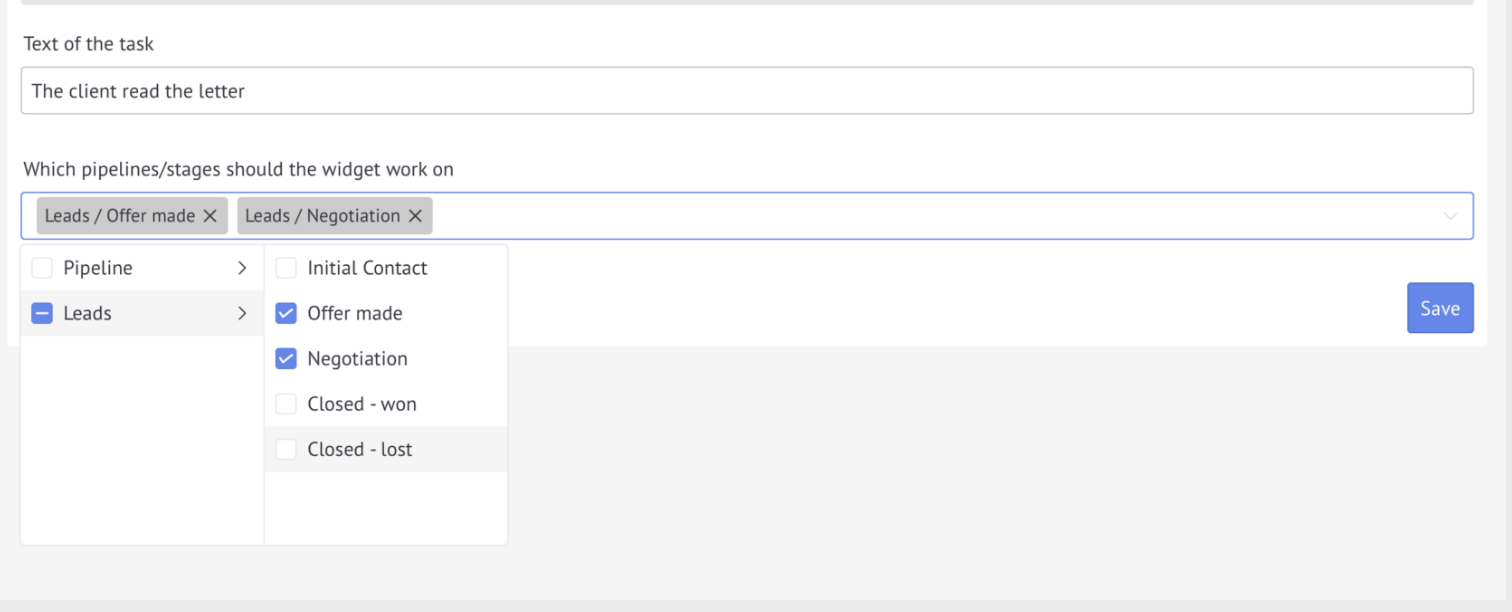
After installing the widget, go to its settings. The key setting option is the choice of funnel stages at which the widget will automatically create tasks after the client reads the email.

In the widget settings, you can select specific stages of the funnel at which a task should be created when the client reads the letter. This allows you to precisely control when and where tasks will be created.

  • Without setting up stages: the task will be created in the first deal of the contact, regardless of the stage
  • With selected stages: a task is created only if the deal is at one of the specified funnel stages
  • Multiple stages: You can select several stages at once in different funnels for more flexible setup
  • If there is no deal at the required stages: the task is not created at all, which eliminates the appearance of unnecessary tasks
Selecting funnel stages to create tasks
  • 1. Open the widget settings in the "Settings" → "Widgets" section in Kommo
  • 2. Select the funnel for which you want to set up automatic task creation
  • 3. Highlight the stages at which it is important to track the reading of emails by clients
  • 4. Repeat for other funnels if necessary
  • 5. Save settings

When to use the widget

Set up a widget for the "Submitted CP" stage. Когда клиент прочитает коммерческое предложение, автоматически создастся задача — напоминание менеджеру позвонить клиенту для обсуждения.

Specify the "Invoice issued" stage. When the client opens a letter with an invoice, a task will be created - a signal to the manager that the client has seen the invoice and the payment terms can be clarified.

At the “Contract Agreement” stage, the widget will create a task as soon as the client reads the letter with the contract. The manager immediately knows that the document has been received and studied.

If you do not select specific stages, the widget will create tasks when the client reads any letter in any of his transactions. Suitable for tracking the activity of all clients.

Recommendations for use

To get the most out of your widget and avoid overwhelming tasks, follow these guidelines when setting up and using it.

  • Choose stages consciously - use the widget only at stages where it is critical to know that the client has read the letter (CP, invoices, contracts, important documents)
  • Ideal for key sales points - commercial proposals, invoices, contracts - where reading the letter by the client signals his readiness for the next step in the transaction
  • Do not place on completed stages - tasks at the “Success” or “Failure” stages are usually not needed and will only clutter the interface
  • Consider the stage in the funnel - the widget checks the stage of the deal at the moment the email is read, so if the deal has already moved to another stage, the task is not created
  • Consider the delay - the task will appear 5-10 minutes after the client reads the letter, this is normal processing time
  • Multiple reading - if a client opens an email several times, multiple tasks may be created. Select stages where appropriate
  • Checking the stage in real time - the widget checks the current stage of the transaction at the time of reading, and not at the time of sending the letter
  • Multiple deals - if a contact has several active deals at the selected stages, a task will be created in each
  • Combine with other automations - the widget works great with other Kommo tools and triggers
  • Customize task types - use different task types for different stages through the built-in capabilities of Kommo
  • Train the team - explain to managers that the task means reading the letter by the client at a certain stage of the funnel