Interface

Multi-Company in Kommo

The Multi-Company widget for Kommo allows you to create multiple connections between contacts and companies, giving you full control over how contacts interact with different organizations.

Features

Multiple contact-company connections
Convenient visualization of relationships
Unlimited number of companies
Easy setup
Works in leads and contacts

Installation and setup guide

Detailed guide for working with widget "Multi-Company in Kommo"

How the widget works

The Multi-Company widget expands the standard functionality of Kommo and removes the limitation on the number of companies that can be attached to a contact or lead.

In the standard version of Kommo, you can only assign one main company to each contact or lead. The Multi-Company widget allows you to create multiple connections and manage an unlimited number of companies for each contact and lead.

Working principle:

  • After installing the widget in the contact and lead cards, it becomes possible to add several companies
  • All attached companies are displayed as a list in a special block
  • You can add, remove and switch between companies at any time
  • Relationships between contacts and companies are saved and displayed on both sides
  • The widget works both in contact cards and lead cards
Features and capabilities

Key Features

  • Multiple contact-company connections - link an unlimited number of companies to one contact
  • Work in leads and contacts - add multiple companies to both contact cards and lead cards
  • Convenient visualization - all companies are displayed in a single list with a clear interface
  • Unlimited number - there is no limit on the number of companies that can be attached
  • Easy setup - the widget is ready to work immediately after installation, no additional configuration required

When to use

The widget is especially useful in the following situations:

  • B2B sales - when one contact works in several companies or represents the interests of different organizations
  • Holding structures - for working with contacts that are associated with several companies within the same holding
  • Affiliate networks - when a partner represents several companies or branches
  • Consulting and audit - specialists often work with several client companies at the same time
  • Franchises and distribution - to track connections with different points and divisions

Benefits of use

  • A complete picture of the relationship - you see all the companies with which the contact is connected
  • Save time - no need to create duplicate contacts for different companies
  • Better analytics - you can track the work of a contact with different organizations
  • Simplifying the work of managers - all information about connections in one place
  • Improving data quality - eliminating duplication of information in the system

Setup and use

The widget does not require special configuration - it is ready to work immediately after installation in your Kommo account.

How to add companies

After installing the widget:

  • Open a contact or lead card
  • Find a block with companies
  • Click the "Add Company" button or the "+" icon
  • Select the desired company from the list or create a new one
  • The company will automatically be added to the list of attached companies

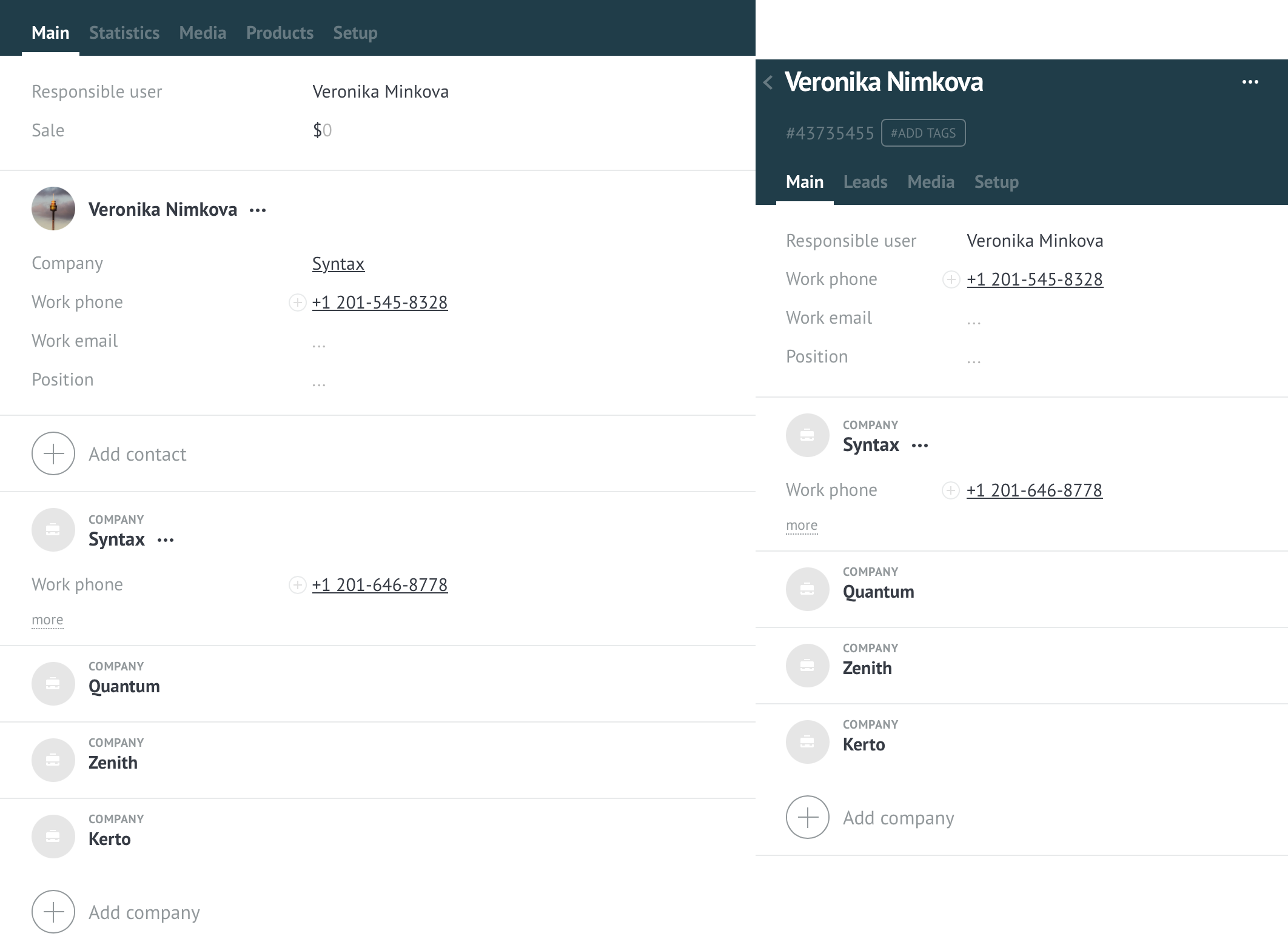
The screenshot below shows an example of how the widget works: the contact “Lena Petrova” is associated with several companies - Miryuota, Blesk, Beauty Corner, Style Line, Elegant. All companies are displayed in both the contact card (left) and lead card (right).

An example of how the Multi-Company widget works - several companies in a contact and lead

Company management

  • Add - click on the add button and select a company from the list
  • View - all attached companies are displayed in a list
  • Delete - delete an unnecessary connection with the company through the context menu
  • Go to company - click on the company name to open its card

All changes are saved automatically and are immediately reflected in all related entities.