Interface

Wrap long field names

Wrap long custom field names in lead cards for better readability

Features

Multi-line field names
Cleaner cards
Works with long labels
No horizontal overflow

Installation and setup guide

Detailed guide for working with widget "Wrap long field names"

Key Features

The widget automatically transfers long field names to Kommo if they do not fit on one line. This improves the readability of the interface and makes working with cards easier.

  • 📝 Automatic hyphenation - field names are transferred to a new line
  • 👁️ Improved readability - long titles are displayed in full
  • 👥 Custom configuration - application for specific managers
  • ⚡ Easy to use - works automatically after activation
Advantages

  • Full display of field names
  • Ease of working with long titles
  • Improving the visual perception of the interface
  • Support for field names in lead, contact and company cards
  • No need to shorten field names

Widget setup

1. Transition to the NOVA platform

Go to Tools in the NOVA platform and find the Migrate Long Field Names tool.

2. Widget activation

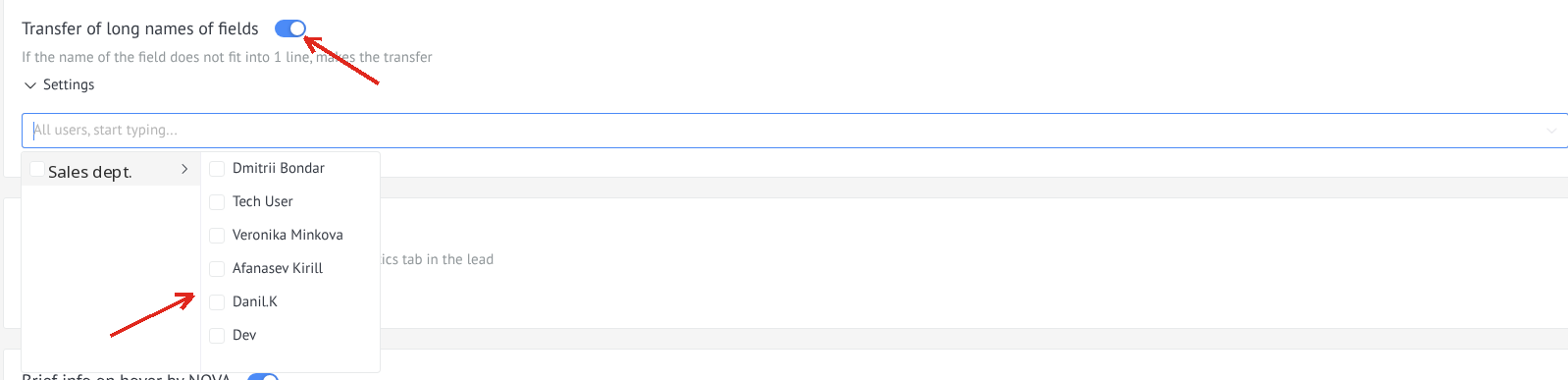
  1. Enable the checkbox to activate the widget
  2. Select managers who will carry over long titles
Widget settings

Usage

After setting up the widget, long field names will be displayed in full with a line break:

Using the widget

Long lines will be shown in full.

⚠️ Important: The widget only applies to selected managers. Managers not added to the list will see the standard display of field names.