Interface

Search in dropdown fields

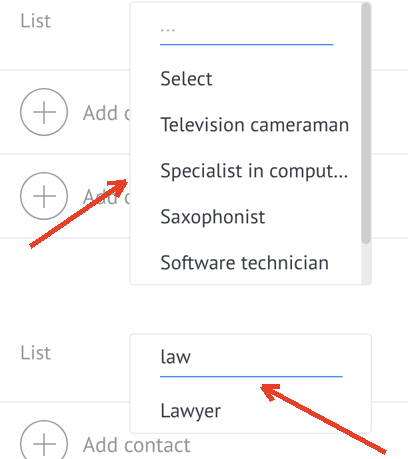
Search inside list-type custom fields when editing records

Features

Search in dropdowns
Faster data entry
Works in lead cards
Less scrolling

Installation and setup guide

Detailed guide for working with widget "Search in dropdown fields"

Description

A widget for adding a search function to Kommo list fields, which greatly simplifies working with fields containing a large number of values.

The "Search List Boxes" widget adds a convenient search field to all list boxes in your Kommo. This is especially useful when there are a large number of values ​​in a list box and manually searching for the correct option takes a long time.
Key Features

  • ✅ Add search to all list fields
  • ✅ Instant filtering of the list as you enter text
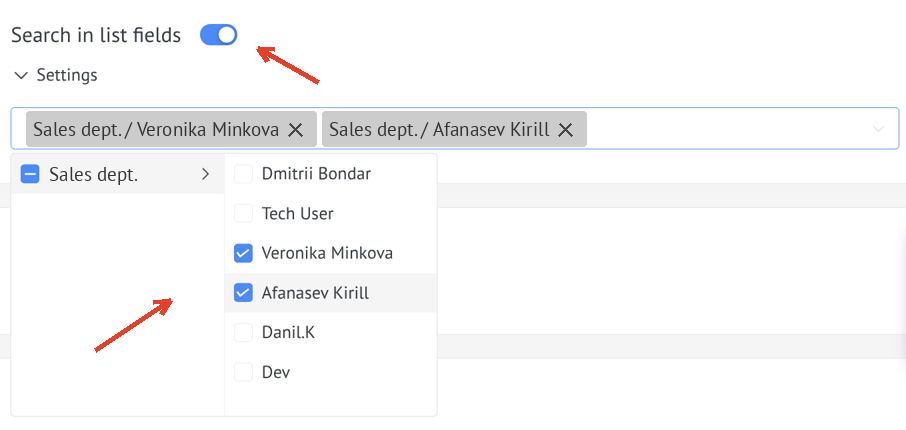
  • ✅ Settings for specific managers
  • ✅ Easy setup via the NOVA platform
  • ✅ Works in leads, contacts, companies and other sections of Kommo where list fields are used

Getting started

To get started with the widget:

  1. Make sure you have an active subscription to the NOVA platform
  2. Go to the Tools section in the NOVA platform
  3. Find the "Search List Boxes" widget
  4. Check the checkbox to activate
  5. Select managers for whom the search will work
  6. Save settings
Widget settings

Usage

After activating the widget, a search field will appear in the list boxes. Start typing and the list of values ​​will automatically filter:

Using the widget