Data

Block editing and deleting notes

Restrict editing and deleting notes for selected users

Features

Protect notes from edits
Protect notes from deletion
Settings by user
Audit-friendly history

Installation and setup guide

Detailed guide for working with widget "Block editing and deleting notes"

Key Features

The widget allows you to prohibit editing and deleting notes for selected managers in Kommo. This ensures that important information is protected from accidental or intentional changes.

  • 🔒 Data Protection - Prevent changes and deletion of notes
  • 👥 Custom settings - applying restrictions for specific managers
  • 🛡️ Information security - guarantee of the integrity of important records
  • ⚡ Easy to set up - intuitive control interface
Advantages

  • Protecting customer communication history
  • Prevent important notes from being deleted
  • Controlling access to editing information
  • Increasing employee responsibility
  • Maintaining an audit of all actions

Widget setup

1. Transition to the NOVA platform

Go to the Tools section in the NOVA platform and find the “Prohibit changing/deleting comments” widget.

2. Widget activation

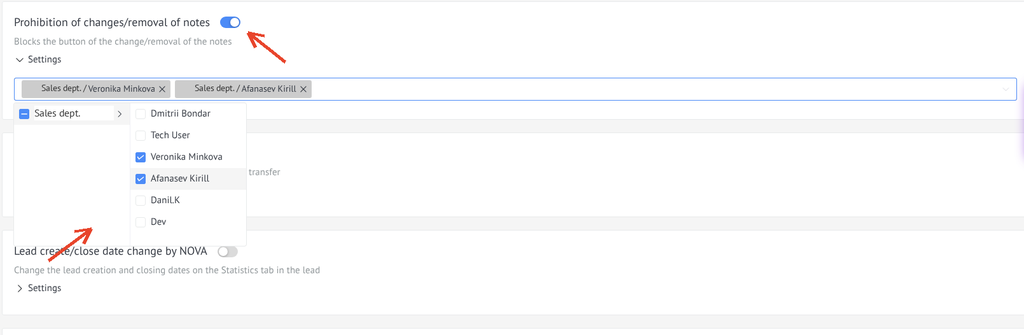
  1. Enable the checkbox to activate the widget
  2. Select managers who will be prohibited from changing and deleting notes
Widget settings

Usage

After setting up the widget, selected managers will not be able to edit or delete notes:

  1. Go to the lead, contact, company or customer card with a note
  2. Hover over note
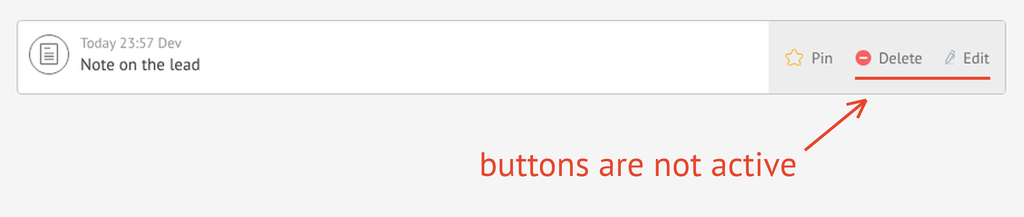
  3. The "Edit" and "Delete"buttons will be inactive
Using the widget

⚠️ Important: Restrictions apply only to selected users. Users not added to the list retain access to edit comments.