Payments

Block invoice status changes

Prevent manual changes to invoice payment status for selected users

Features

Lock invoice status
Settings by user
Fewer payment errors
Controlled workflow

Installation and setup guide

Detailed guide for working with widget "Block invoice status changes"

Key Features

The widget allows you to prohibit changing the account status for selected managers in Kommo. This provides control over the invoice process and prevents unauthorized changes.

  • 🔒 Data protection - preventing changes in account status
  • 👥 Custom settings - applying restrictions for specific managers
  • 🛡️ Process control - guarantee of compliance with work procedures
  • ⚡ Easy to set up - intuitive control interface

Advantages

  • Protecting financial data from accidental changes
  • Controlling access to changing account statuses
  • Increasing employee responsibility
  • Compliance with established business processes
  • Preventing errors in working with documents

Widget setup

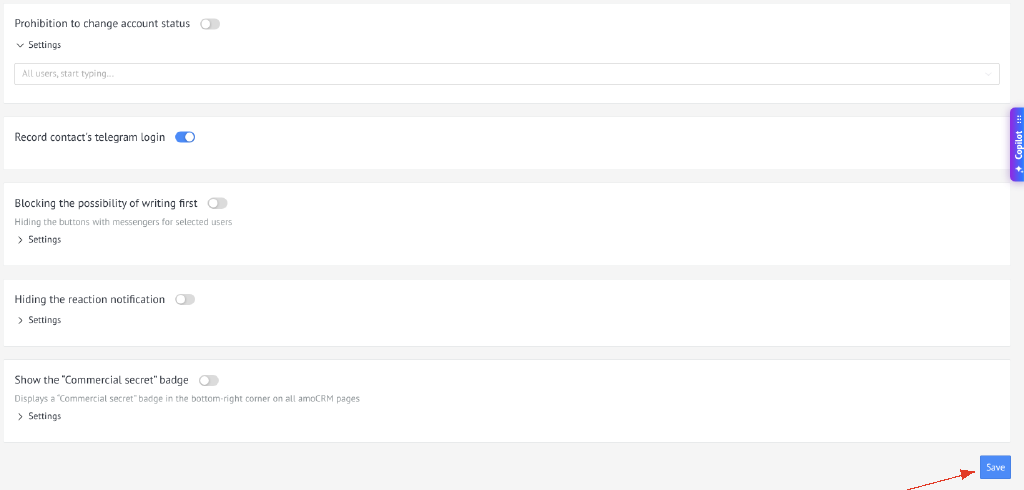
For settings you need to go to the widget settings section and enable the widget

Go to widget settings and enable

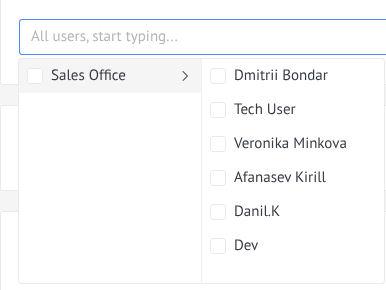
Select users for whom the widget will be available

Selecting users for the widget

and Save

Saving widget settings

How to use

  1. Go to lead
  2. Go to the Statistics section
  3. And change the creation/closing date
Changing the date of creation and closing of a lead

Usage

After setting up the widget and enabling the checkbox, selected users will not be able to change the account status in the Kommo interface:

  1. When trying to change the account status, the user will see a restriction
  2. The status change function will not be available for selected managers
Using the widget

⚠️ Important: Restrictions apply only to selected users. Users not added to the list retain access to change account statuses.