Go to the NOVA platform.
- Go to the Tools section
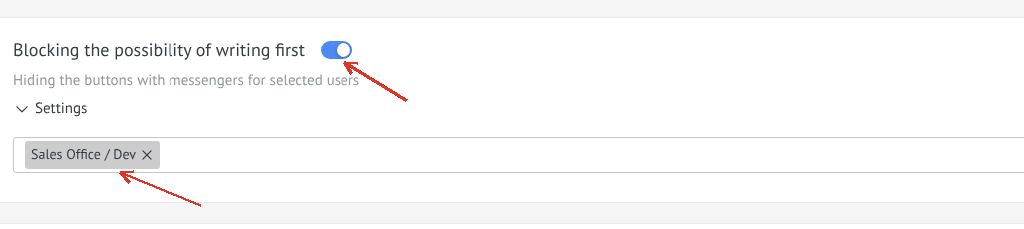
- Find the widget "Block the ability to write first"
- Enable the checkbox to activate the widget
- Select managers who will be prohibited from writing to the client first
Restrict selected users from sending the first message in chats
Detailed guide for working with widget "Block initiating conversations"
Go to the NOVA platform.
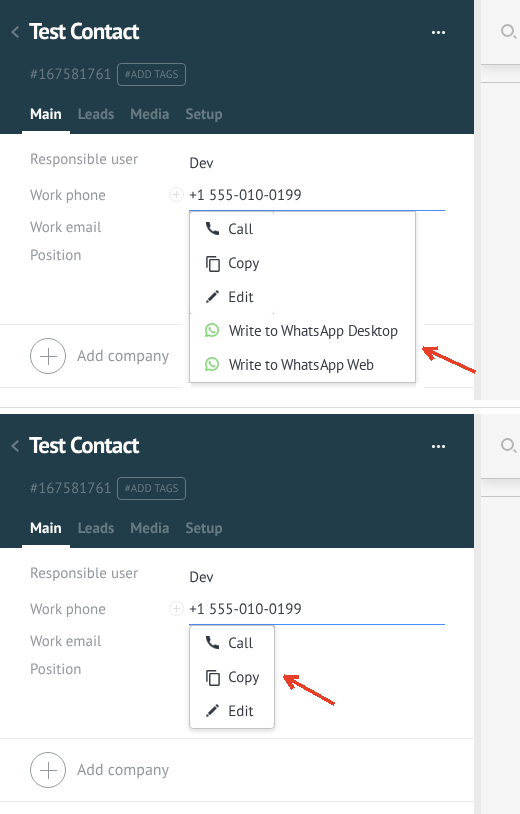
When the function is enabled: the manager hides the buttons for third-party messengers in the contact card, so he cannot start a conversation first through these buttons.
When the function is disabled: buttons for third-party messengers are displayed as usual.
This setting helps control the interaction of managers with clients and prevents unwanted sending of messages.